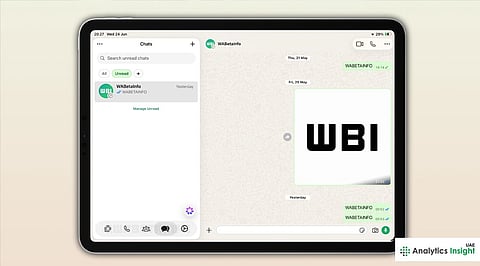


WhatsApp has rolled out a refreshed Liquid Glass-inspired interface for iPad users, bringing a cleaner visual experience that aligns with Apple's latest design language. The update enhances the app's appearance while maintaining familiar features and improving overall usability. WhatsApp for iPad could receive even more in the future. Specifically, more improvements regarding Liquid Glass, a redesigned sidebar, and a dedicated section for locked chats.
The new interface has been rolled out to certain beta testers and even some regular users on the stable build of the app, according to WhatsApp feature tracker WABetaInfo. Although Meta has yet to announce an official release date, this update will roll out to more users in the coming weeks.
The buttons throughout the app have been given a frosted glass look as well. When pressed, these buttons animate slightly, whereas the menu controls and contextual actions all have the same translucent design.
In this case, the updated user interface for WhatsApp's iPad application aligns with the Liquid Glass design system, created by Apple specifically for iPadOS 26 and iOS 26, which uses translucent interface elements, floating navigation controls, and animations.
One of the most obvious changes is the newly designed tab bar, which is no longer fixed at the bottom of the screen but floats above and is somewhat translucent. Unlike the interface of the iPhone application, the iPad interface does not use text labels under icons but only icons.
There is also a new look for the navigation bar, which gradually becomes translucent when the user scrolls down the chat list.
Also Read: Kaspersky Warns of Malware Campaign Targeting WhatsApp Web and Desktop Users
Although WhatsApp for iPhone, iPad, and Mac shares much of the same underlying code, new features are often released separately. Meta typically introduces major interface changes in stages. It allows developers to monitor performance and fix bugs before expanding availability.
Recent beta versions for iPhone add the translucent design to the in-chat message bar, while WhatsApp is reportedly working on additional visual improvements for its Mac app, including a redesigned sidebar and dedicated section for locked chats.
With the new design applied to its interface, WhatsApp becomes much more intuitive to use on the iPad, thanks to seamless integration with Apple's current design language. Even though there are no changes to its functionality, the improved graphics make the app easier to read and navigate.